BajaNomad

Somebody must know something about gps and maps and Baja?

chrisx - 7-30-2011 at 07:05 PM

I finaly got a GPS.


Some where in the world I expect maps of Baja exist. No no, not the city street maps Garmin sells. Some back country topo style maps with hills and mountains and such.

Up until now I've been getting by on navigation tactics straight from the 1859 Cavalry manual.

Day in the life
My map Shows a road heading south through the mountains. You know, travel east for 11 or 12 miles, turn right travel another 15 etc. 6 or 7 miles along and I'm on a trail instead of a road. This does not match my map exactly. When does Baja match my map? The pointed mountain off in the distance seems to be on the map, only a few points east of where I think it should be. The trail turns into a sand creek bed. Dry soft deep hard to push a bicycle through sand.

Best to turn back. 10 miles of sand or 50 miles of road take about the same amount of time. On the road again and a little thirsty. What happened to my water? My ten mile search pattern is not succesful. The river of sand must have swallowed my last bottle of water. I have some serious bike lights, this seems like the right time to use them. 5 hours into the dark I find a place to make camp.

Somebody must know something about gps and maps and Baja?

woody with a view - 7-30-2011 at 07:08 PM

chale vato!

i just know you used to be an idiot, but i don't know about these days.

how are the fat chicks in the honda's treating you these days?

chrisx - 7-30-2011 at 07:14 PM

Is there a way to block woody from posting? She makes this web page unbearable.

J.P. - 7-30-2011 at 07:17 PM

Maps, I think DAVID K. has more maps of BAJA than the Mexican Goverment, AAA,and National Geographics combined or you could do as I do if I think I am lost I head East or West until I see Water Dont need any friggin maps:lol::lol::lol:

MikeYounghusband - 7-30-2011 at 07:17 PM

Thats what makes Baja, Baja. David K. knows about what you seek and can provide

rts551 - 7-30-2011 at 07:21 PM

OK

I haven't a source for good/accurate maps.

I use Navigator and expeditioner and then build my own.

http://www.lbmaps.com/lb_baja.htm
http://www.mexicomaps.com/mexico_gps.lasso?itemid=8303&-...

Bajatripper - 7-30-2011 at 07:35 PM

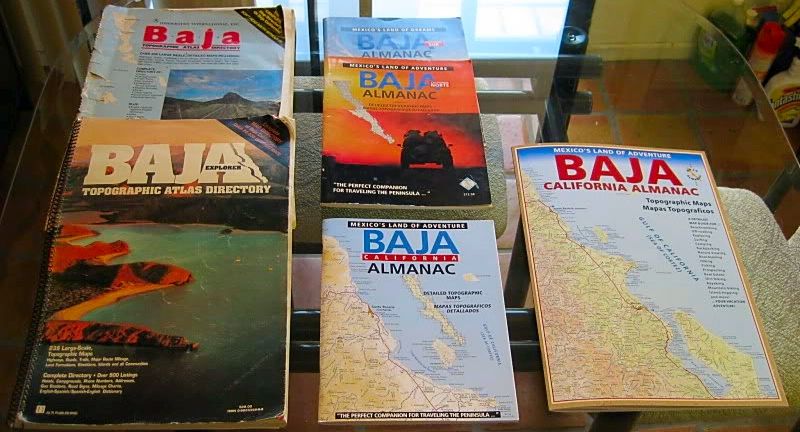
What you need is a Baja California Almanac, usually available from Discover Baja in San Diego. They run about $25.

If you are really lucky, you might get ahold of a Baja Explorer Topographic Atlas Directory, which has been out of print for a while. It has the largest scale I've come across of the peninsula, but is somewhat dated now.

rts551 - 7-30-2011 at 08:13 PM

I think he wants a GPS maps for his GARMIN.

BajaGringo - 7-30-2011 at 08:19 PM

Quote:
Originally posted by rts551
I think he wants a GPS maps for his GARMIN.


Garmin makes bicycles???

ElCap - 7-30-2011 at 08:32 PM

I bought "Baja Navigator" GPS maps for my Garmin from Larry Buck at http://www.lbmaps.com/
They work greta for me, and Larry was very helpful when I had an installation glitch. About $40, and well worth it.

Bajatripper - 7-31-2011 at 01:19 AM

Quote:
Originally posted by rts551
I think he wants a GPS maps for his GARMIN.


Yep, you're right. My bad.

Best Baja GPS map

motoged - 7-31-2011 at 11:16 AM

I use this GPS map when in Mexico:

http://www.cartografiagps.com/mape32/index.htm

David K - 7-31-2011 at 11:50 AM

Quote:
Originally posted by MikeYounghusband
Thats what makes Baja, Baja. David K. knows about what you seek and can provide


Thanks for the kind words amigos... Seriously, I do use Google Earth to see an area and there you can insert a GPS waypoint if you have one or get GPS waypoints of things you want to see or go to. Wiki-Mapia is also a source for maps online to make your own.

If using a Garmin GPS, I have seen LB MAPS that Ralph and others mentioned, and that should do well...

It would indeed be dangerous for ChrisX to be out in the boonies on his bicycle without a GPS, IMO!

David K - 7-31-2011 at 11:58 AM

Quote:
Originally posted by Bajatripper
What you need is a Baja California Almanac, usually available from Discover Baja in San Diego. They run about $25.

If you are really lucky, you might get ahold of a Baja Explorer Topographic Atlas Directory, which has been out of print for a while. It has the largest scale I've come across of the peninsula, but is somewhat dated now.


Here they all are... all produced by Landon Crumpton...


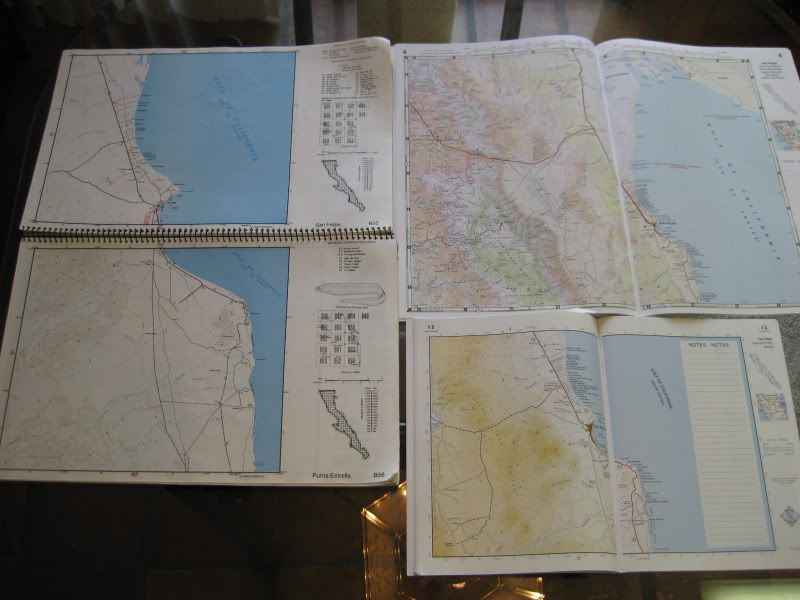
There have been three sizes (scales)... The orig. Baja Topo Atlas was the larges and most detailed sacle, and the biggest pages. The next two versions had a smaller scale, and 8.5 x 11 inch pages. The newest version has an even smaller scale (the least detail) and went to a bigger size page.


The three scales of the same region (San Felipe).

bajalou - 7-31-2011 at 12:08 PM

Quote:
Originally posted by motoged
I use this GPS map when in Mexico:

http://www.cartografiagps.com/mape32/index.htm


I have LB maps which works fine for me but this stuff from Cartografiagps looks pretty good - and covers all of Mexico if you wander a bit.

mcfez - 7-31-2011 at 12:50 PM

Quote:
Originally posted by David K


There have been three sizes (scales)... The orig. Baja Topo Atlas was the larges and most detailed sacle, and the biggest pages. The next two versions had a smaller scale, and 8.5 x 11 inch pages. The newest version has an even smaller scale (the least detail) and went to a bigger size page.


Baja California is a great map. We use that mostly.

woody with a view: that's a tough view of crisX......and I couldnt agree with you more! We all remember this idiot coing on board here.....first post was about BN's being a bunch of drunks...and he degrading the larger ladies here by using the term "fat ladies". Still more insults I do not have the time to list....that this idiot blasted at us.

May that lady in the red car.......spot him someday on a Baja road.....


[Edited on 7-31-2011 by mcfez]

Jack Swords - 7-31-2011 at 12:54 PM

For Topos, find a INEGI office (there is one in La Paz) and you can get excellent Topo maps by the Mexican government. They will also put many requested maps on a CD so you can zoom in, highlight a section, and print out exactly what you want. We have used these maps (both paper and digital) for all our wanderings in Baja Sur.

http://www.bicimapas.com.mx/de%20los%20mapas%20topograficos....

Roberto - 7-31-2011 at 01:57 PM

Have fun - there's lots here.

http://www.lib.utexas.edu/maps/mexico.html

Udo - 7-31-2011 at 02:10 PM

Here is what I found was a very popular GPS;


RichBaja - 7-31-2011 at 02:14 PM

Quote:
Originally posted by chrisx
Is there a way to block woody from posting? She makes this web page unbearable.


:lol::lol::lol::lol::lol::lol::lol::lol::lol:

chrisx - 7-31-2011 at 02:20 PM

Quote:
Originally posted by Udo
Here is what I found was a very popular GPS;


si bueno

motoged - 7-31-2011 at 03:42 PM

Okay, when you guys are finished joking around, getting it that he isn't asking for paper maps, realize he is asking for GPS maps, and have another cerveza while you are pleased with your wit and omniscience..... :biggrin: check out my previously offered link....it surpasses all others mentioned so far:

Quote:
Originally posted by motoged
I use this GPS map when in Mexico:

http://www.cartografiagps.com/mape32/index.htm

luv2fish - 7-31-2011 at 04:35 PM

Quote:
Originally posted by chrisx
Is there a way to block woody from posting? She makes this web page unbearable.

Chale vato Woody's one of our "Senior" Nomads or "Varsity" players here on the site. Oh and I think Woody is a he and not a she. He actually makes the site more enjoyable if you will, he and a few other sharks.

805gregg - 7-31-2011 at 05:23 PM

Quote:
Originally posted by ElCap
I bought "Baja Navigator" GPS maps for my Garmin from Larry Buck at http://www.lbmaps.com/
They work greta for me, and Larry was very helpful when I had an installation glitch. About $40, and well worth it. [/quote

I agree, these are great.

chrisx - 7-31-2011 at 05:39 PM

sounds about right
"THE BEST TOPO MAP FOR OFF ROAD IN MEXICO

OFF-ROAD, 4x4, ATVs, ENDURO, CYCLING, HUNTING, ADVENTURE TOURISM AND MORE "

note to self; read this one again


Quote:
Originally posted by motoged
Okay, when you guys are finished joking around, getting it that he isn't asking for paper maps, realize he is asking for GPS maps, and have another cerveza while you are pleased with your wit and omniscience..... :biggrin: check out my previously offered link....it surpasses all others mentioned so far:

Quote:
Originally posted by motoged
I use this GPS map when in Mexico:

http://www.cartografiagps.com/mape32/index.htm

Desertbull - 7-31-2011 at 06:55 PM

I think the reason for the whimsical responses and not a serious response is because most people don't want to give up their own GPS info and trails etc. Many people have an incredible amount of hours invested in their GPS systems, files and maps.

Anyway, an easy solution is offered by PCI Race Radios in Long Beach, Ca. They offer a download that you purchase and then upload to your GPS. It's available in GPX (Garmin) or USR (Lowrance).

This file contains the entire Baja Peninsula, every town, highways, villages, dirt roads, fishing villages, containing streets etc. It also contains the majority of general dirt trails of Baja. It's not cheap, but consider that someone had to do all the work sometime. I'm not affiliated with PCI, but I do know that it works excellent as I have it and use it in all my GPS units.

Take into consideration that many of the tour guys all have their own GPS files of back trails, crossover trails from Pacific to Sea od Cortez and beach routes. And no one wants to share their "secret" GPS files.

Hope this helps!


http://www.pciraceradios.com/ProductDetail.jsp?LISTID=480051...

bajaguy - 7-31-2011 at 07:03 PM

I would not venture anywhere with just a GPS. Good paper topo maps used with a GPS are the way to go.

chrisx - 7-31-2011 at 08:04 PM

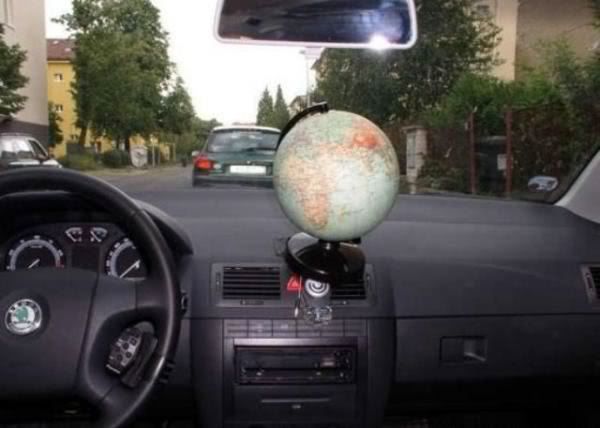
Suunto MC-2 Global
no batteries needed
works every place


Quote:
Originally posted by bajaguy
I would not venture anywhere with just a GPS. Good paper topo maps used with a GPS are the way to go.


si bueno

motoged - 8-1-2011 at 10:26 AM

Quote:
Originally posted by Desertbull
I think the reason for the whimsical responses and not a serious response is because most people don't want to give up their own GPS info and trails etc. Many people have an incredible amount of hours invested in their GPS systems, files and maps. ....


I like the joking :biggrin:

He just isn't asking for private track logs or secret spots....just GPS map software....he will make his own files, or not ....entering spots where fat ladies in Hondas present unlimited danger, speeders are recklessly drinking and driving, areas where no one can pedal a bicycle in soft sand, and points of interest only he would want to remember. :)

CortezBlue - 8-1-2011 at 10:50 AM

Quote:
Originally posted by chrisx
I finaly got a GPS.


Some where in the world I expect maps of Baja exist. No no, not the city street maps Garmin sells. Some back country topo style maps with hills and mountains and such.

Up until now I've been getting by on navigation tactics straight from the 1859 Cavalry manual.

Day in the life
My map Shows a road heading south through the mountains. You know, travel east for 11 or 12 miles, turn right travel another 15 etc. 6 or 7 miles along and I'm on a trail instead of a road. This does not match my map exactly. When does Baja match my map? The pointed mountain off in the distance seems to be on the map, only a few points east of where I think it should be. The trail turns into a sand creek bed. Dry soft deep hard to push a bicycle through sand.

Best to turn back. 10 miles of sand or 50 miles of road take about the same amount of time. On the road again and a little thirsty. What happened to my water? My ten mile search pattern is not succesful. The river of sand must have swallowed my last bottle of water. I have some serious bike lights, this seems like the right time to use them. 5 hours into the dark I find a place to make camp.

Somebody must know something about gps and maps and Baja?


Silly Gringo, don't you know that most GPS companies don't know that Mexico is in North America?

I bought a GPS that said, with North America maps. It included Canada and USA. I called, and even the customer support person argued with me that, first, Mexico was in South America and then, no, Central America. I had to talk her into looking on Google 'til she agreed with me.

However, that being said, do you have an Android or Iphone?

I just downloaded TomTom for my Iphone with Mexico maps and it was pretty good. Now, it will not have off road places that many folks discuss on here, but it does have the main highways etc.

Good Luck

bigzaggin - 8-1-2011 at 12:47 PM

Quote:
Originally posted by David K
Quote:
Originally posted by Bajatripper
What you need is a Baja California Almanac, usually available from Discover Baja in San Diego. They run about $25.

If you are really lucky, you might get ahold of a Baja Explorer Topographic Atlas Directory, which has been out of print for a while. It has the largest scale I've come across of the peninsula, but is somewhat dated now.


Here they all are... all produced by Landon Crumpton...


There have been three sizes (scales)... The orig. Baja Topo Atlas was the larges and most detailed sacle, and the biggest pages. The next two versions had a smaller scale, and 8.5 x 11 inch pages. The newest version has an even smaller scale (the least detail) and went to a bigger size page.


The three scales of the same region (San Felipe).


How on earth do you still have Almanacs with the cover intact? I typically lose mine on trip #2, when hurriedly re-shoving the thing into the side of the door at some fork in the washboards.

chrisx - 8-1-2011 at 01:14 PM

http://www.youtube.com/watch?v=5Z8nhritrso

Gps tracks of baja pavement are like maps of a grocery store, something few people need.


In zona de no fat lady:

the road on the ground and the roads on the map some times do not match. Being lost is more of a blessing than a curse, until the water is gone. Sometimes the road turns to sand, sometimes the river is the road, sometimes the map shows a road where there is none, sometimes there is a road where the map shows none.

David K - 8-1-2011 at 05:28 PM

Quote:
Originally posted by bigzaggin

How on earth do you still have Almanacs with the cover intact? I typically lose mine on trip #2, when hurriedly re-shoving the thing into the side of the door at some fork in the washboards.


The cover of the first edition Baja Topo Atlas is indeed torn off the ring binding after just small amount of use... The second edition stays in my book collection here.

The 1998-ish 2 book Baja Almanacs... the Norte one is held together with duct tape and is marked up with my notes... but I have a second, pristine one. The Sur is in good shape.

The 2003 edition, well it has a torn cover with duct tape and notes inside, but I have a second pristine copy!

The bigger 2009 edition... well I bought 3 copies when they came out... one copy has my notes in it (the latitude figures were wrong on several of the maps).

I often get second copies of Baja books... gave many to Antonio (BajaCactus) for his future Baja Library in El Rosario... and I gave away some books for door prize raffles at my Viva Baja parties... including a Sea of Cortez by Ray Cannon!

The secret is to go to used book stores!

Fernweh - 8-1-2011 at 07:00 PM

I like to use a laptop when traveling the Baja and have Google Earth running......

I do have to scan the area I like to visit into GE's cache when still online and use that saved cache file (max 2G) when offline.

Two small nifty programs are part of my set-up:

GPS for Google Earth and Cache for Google Earth

you'll find both here: http://www.drregener.com/en/

Together with a small Bluetooth GPS receiver I then can track my route/position in real time on that "cache map".

It works anywhere, not just down the Baja.

Karl

Desertbull - 8-1-2011 at 09:03 PM

Quote:
Originally posted by motoged
Quote:
Originally posted by Desertbull
I think the reason for the whimsical responses and not a serious response is because most people don't want to give up their own GPS info and trails etc. Many people have an incredible amount of hours invested in their GPS systems, files and maps. ....


I like the joking :biggrin:

He just isn't asking for private track logs or secret spots....just GPS map software....he will make his own files, or not ....entering spots where fat ladies in Hondas present unlimited danger, speeders are recklessly drinking and driving, areas
where no one can pedal a bicycle in soft sand, and points of interest only he would
want to remember. :)


The maps from PCI are very detailed for public use, but I know many people who use "other" self constructed digital maps, which have been tediously triangulated using known Baja waypoints, for mobile use with the iPad and many different GPS's, all which allow for really cool real time tracking without mobile Internet even in Baja...so I was trying to say that their is private GPS map software that is way more advanced then you could imagine, and those files are kept close by many, so the PCI files will work.

I have been using the iPad exclusively since it's release and with the software and maps that have been shared with us, all I can say "wow.". The iPad is widely used
by pilots around the globe...similar technology in use on the ground in Baja. No
Internet needed. :-)

David K - 8-2-2011 at 08:09 AM

Nobody has mentiond Kacey Smith's books: All About Your Whereabouts (The Baja GPS Guide) Volume 1 & 2. (Vol. 2 is an e-book)

http://www.bajagpsguide.com

Primarily for motorbike riders, but many roads included.

[Edited on 8-2-2011 by David K]

tripledigitken - 8-2-2011 at 08:25 AM

Quote:
Originally posted by Desertbull
Quote:
Originally posted by motoged
Quote:
Originally posted by Desertbull
I think the reason for the whimsical responses and not a serious response is because most people don't want to give up their own GPS info and trails etc. Many people have an incredible amount of hours invested in their GPS systems, files and maps. ....


I like the joking :biggrin:

He just isn't asking for private track logs or secret spots....just GPS map software....he will make his own files, or not ....entering spots where fat ladies in Hondas present unlimited danger, speeders are recklessly drinking and driving, areas
where no one can pedal a bicycle in soft sand, and points of interest only he would
want to remember. :)


The maps from PCI are very detailed for public use, but I know many people who use "other" self constructed digital maps, which have been tediously triangulated using known Baja waypoints, for mobile use with the iPad and many different GPS's, all which allow for really cool real time tracking without mobile Internet even in Baja...so I was trying to say that their is private GPS map software that is way more advanced then you could imagine, and those files are kept close by many, so the PCI files will work.

I have been using the iPad exclusively since it's release and with the software and maps that have been shared with us, all I can say "wow.". The iPad is widely used
by pilots around the globe...similar technology in use on the ground in Baja. No
Internet needed. :-)


Very interesting use of the iPad. What GPS do you use for this setup? No reason this couldn't be done with a laptop I suppose. Please explain how the GPS interfaces with the cached maps, and what program is used for that. Pardon me if I missed that in the explanation.

Ken

wilderone - 8-3-2011 at 08:25 AM

"the road on the ground and the roads on the map some times do not match. Being lost is more of a blessing than a curse, until the water is gone. Sometimes the road turns to sand, sometimes the river is the road, sometimes the map shows a road where there is none, sometimes there is a road where the map shows none. "

Such is the lure and adventure of Baja CA. I would add to that - wish all the squiggly blue lines on a topo meant there was actually water in these waterways. You have come to the correct conclusion - carry extra water and enjoy the adventure.

Desertbull - 8-3-2011 at 08:57 AM

Quote:
Originally posted by tripledigitken
Quote:
Originally posted by Desertbull
Quote:
Originally posted by motoged
Quote:
Originally posted by Desertbull
I think the reason for the whimsical responses and not a serious response is because most people don't want to give up their own GPS info and trails etc. Many people have an incredible amount of hours invested in their GPS systems, files and maps. ....


I like the joking :biggrin:

He just isn't asking for private track logs or secret spots....just GPS map
software....he will make his own files, or not ....entering spots where fat ladies in

Hondas present unlimited danger, speeders are recklessly drinking and driving, areas
where no one can pedal a bicycle in soft sand, and points of interest only he would
want to remember. :)


The maps from PCI are very detailed for public use, but I know many people who use "other" self constructed digital maps, which have been tediously triangulated using known Baja waypoints, for mobile use with the iPad and many different GPS's, all which allow for really cool real time tracking without mobile Internet even in Baja...so I was trying to say that their is private GPS map software that is way more advanced then you could imagine, and those files are kept close by many, so the PCI files will work.

I have been using the iPad exclusively since it's release and with the software and maps that have been shared with us, all I can say "wow.". The iPad is widely used
by pilots around the globe...similar technology in use on the ground in Baja. No
Internet needed. :-)


Very interesting use of the iPad. What GPS do you use for this setup? No reason this couldn't be done with a laptop I suppose. Please explain how the GPS interfaces with the cached maps, and what program is used for that. Pardon me if I missed that in the explanation.

Ken


The iPad and the GNS 5870 MFI GPS-Bluetooth along with several different software Apps have been widely used in the aviation field. Those super smart pilot types are the guys that figured this all out, me and my friends have just adopted it for use in Baja using the maps we created, I've chatted with others who have used this system as well. We create our maps using OziXplorer software.

For use on the iPad we use the GPX Motion HD App found in the iTunes App Store. You simply download the GPX Motion App and upload your selection of cached maps via GPX, they have an easy to use procedure for uploading that is detailed in their software.

The GPS is the GNS 5870 MFI GPS BT Receiver Reliable GPS - See Below Cut and Paste info on the GPS. I purchased the GNS 5870 for $90 from an aviation supply company.

__________________________________________________________________

Now "waas" Enabled!

Transform your iPad, iPhone or iPod into a precise and fast navigation system. With the new wireless GNS 5870 MFI for the first time a portable highly-sensitive Hybrid-GPS receiver with Bluetooth technology for different Apple devices is available. The new GNS 5870 MFI is fully certified by Apple. The GNS 5870 MFI GPS-Bluetooth receiver works with the Apple iPad, iPhone 3G, iPhone 3GS (as of iPhone OS 3.0.1), iPod touch 2G, iPod touch 3G and with other Bluetooth-capable handhelds such as smartphones, notebooks and PDAs. The quality seal "Made for iPod/iPhone/iPad“ guarantees full compatibility to Apple products.  

The GNS 5870 MFI has a high-sensitive 32-channel GPS chip and a high-quality Bluetooth interface. And even under difficult reception conditions such as near high buildings, the receiver allows reliable and wireless GPS reception. With an operating time of more than 10 hours you can use the receiver especially for outdoor pursuits, such as for mountain-bike or hillwalk navigation. Efficient power management means that the receiver switches itself off when there is no Bluetooth connection.

The GNS 5870 MFI always communicates wirelessly via Bluetooth. For your iPad, iPhone or iPod touch you must only set up once the connection to the receiver. After that the receiver automatically connects with your Apple device. For additional comfort the GNS 5870 MFI is operated via Smart Touch Technology. You can switch the receiver on or off only by moving your finger over the touch panel. With its small and light-weight form, the receiver is a reliable and convenient GPS solution ideal for use in cars or motor homes, on motorcycles, bicycles or on foot.

tripledigitken - 8-3-2011 at 09:06 AM

Desertbull,

Thanks very much for the information.

Ken