shari
Select Nomad

Posts: 13052
Registered: 3-10-2006
Location: bahia asuncion, baja sur
Member Is Offline
Mood: there is no reality except the one contained within us "Herman Hesse"
|
|
info on wireless antennas por favor
some folks here are cooperating and getting one phone line and sharing the wireless with their neighbours. I was looking on the internet about how to
boost a signal and was wondering if anyone has experience with how the more economic brands work to boost the signal a bit...do you need an expensive
one? is there a fairly cheap one that works? what kind works well...there are sooo many choices? I hope some of you can shed some light on this
subject...gracias amigos.
|
|
|
Russ
Elite Nomad
Posts: 6742
Registered: 7-4-2004
Location: Punta Chivato
Member Is Offline
|
|
Hi ya Shari! I'm using a Linksys router and supplying a lot of people's internet needs. I think the router was about $125 and the external antenna
about the same. This setup works so well I had to enable the security feature because the more people on it at the same time will really slow it down.
Look at these videos they should explain about it. http://www.topbits.com/how-to-setup-a-linksys-router.html My unit is an older model and has removable antennas that you can hook to an external
antenna. If you're going to service people ar any distance you'll want this feature.
Here were you can ask questions about what you may need or just info in general. http://www.justanswer.com/
[Edited on 4-27-2010 by Russ]
Bahia Concepcion where life starts...given a chance!
|
|
|
rts551
Elite Nomad
Posts: 6700
Registered: 9-5-2003
Member Is Offline
|
|
If you are receiving a neighbors signal, look at these......
Hawking Hi-Gain WiFi Signal Booster Wireless network amplifier
|
|
|
comitan
Ultra Nomad
Posts: 4177
Registered: 3-27-2004
Location: La Paz
Member Is Offline
Mood: mellow
|
|
Shari
This is what I have and it works very well. But you have to have the 9db antenna.
http://www.hawkee.com/shop/prod/9971924/reviews/
[Edited on 4-27-2010 by comitan]
Strive For The Ideal, But Deal With What\'s Real.
Every day is a new day, better than the day before.(from some song)
Lord, Keep your arm around my shoulder and your hand over my mouth.
“The sincere pursuit of truth requires you to entertain the possibility that everything you believe to be true may in fact be false”
|
|
|
Howard
Super Nomad
Posts: 2353
Registered: 11-13-2007
Location: Loreto/Manhattan Beach/Kona
Member Is Offline
Mood: I'd rather regret the things I've done than regret the things I haven't done.
|
|
A slight hi-jack here
High Shari! Gringo the Dingo, my Yellow Lab says woof, woof, to everyone there.
Russ, what do you suggest for a laptop? It seems like at a few RV parks they have WiFi but unless I am very close to the source, I cannot get the
signal. Can you suggest anything that I can use on my laptop to have a better chance of receiving the signal?
We don't stop playing because we grow old;
we grow old because we stop playing
George Bernard Shaw
|
|
|
Pescador
Ultra Nomad
Posts: 3587
Registered: 10-17-2002
Location: Baja California Sur
Member Is Offline
|
|
An external antenna like the LInksys Wireless that comes in a 2.4 Ghz works pretty well and will give you a stronger signal than the internals in your
laptop. I had the system that I sold to Russ to set up in a trailer park and was going to share the system with a number of people in order to bring
the cost down slightly but found out that I did not have adequate power to run the system all day. Shari should have not trouble at Asuncion because
they are on the power grid there. Wayne Davy from San Lucas had helped me set up the whole system and he found the best equipment and prices came
from these guys.
http://ba-electronics.com/asccustompages/products.asp
|
|
|
jak
Banned
Posts: 114
Registered: 3-10-2010
Member Is Offline
|
|
Here is an inexpensive way to increase a weak signal using a USB wireless device and some common items. I have seen something similar in operation
and it does boost a signal considerably.
http://www.usbwifi.orconhosting.net.nz/
|
|
|
Bob and Susan
Elite Nomad
Posts: 8813
Registered: 8-20-2003
Location: Mulege BCS on the BAY
Member Is Offline
Mood: Full Time Residents
|
|
we have a linksys but the distance and power is limited
you are talking about "broadcasting"
you actually need a more powerful wireless and antennas for the receivers
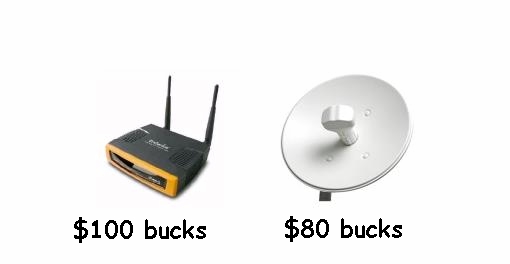
ECB-3500 600mW 802.11b/g Bridge
|
|
|
Russ
Elite Nomad
Posts: 6742
Registered: 7-4-2004
Location: Punta Chivato
Member Is Offline
|
|
Here is what 90% of the folks here are using with their lap tops. Doesn't / didn't work with Mac though.
http://www.airlink101.com/products/awll3055.php
It was normally around $45 at Fry's but went on sale for $25 a couple times a year. I like it because you can move it around and aim it. It's 10db
gain which is as good as I've seen for a small antenna.
Pescador, I remember the site you gave me a long time ago but the one you posted isn't working for routers (for me).
Bahia Concepcion where life starts...given a chance!
|
|
|
Bob and Susan
Elite Nomad
Posts: 8813
Registered: 8-20-2003
Location: Mulege BCS on the BAY
Member Is Offline
Mood: Full Time Residents
|
|
remember...
if a bunch of people are streaming music or downloading videos you service will be really SLOW!!!
bandwith...
|
|
|
shari
Select Nomad
Posts: 13052
Registered: 3-10-2006
Location: bahia asuncion, baja sur
Member Is Offline
Mood: there is no reality except the one contained within us "Herman Hesse"
|
|
wow....I just KNEW I'd get some creative answers from nomads...
thanks so much for this link jak...LOVE this option and gonna try it out.
http://www.instructables.com/id/Uni-Directional-WIFI-Range-E...
we were only interested in getting a signal to neighbours and not long range...more like a family favour so as not to diminish band with but it will
be fun to fool around with some of these options...hope dianne t is monitoring this thread.
|
|
|
bajalou
Ultra Nomad
Posts: 4459
Registered: 3-11-2004
Location: South of the broder
Member Is Offline
|
|
What kind of speed do you have? That will tell you if the use by others will degrade your service. For Skype calls etc. sometimes just surfing th
web will cause problems,
No Bad Days
\"Never argue with an idiot. People watching may not be able to tell the difference\"
\"The trouble with doing nothing is - how do I know when I\'m done?\"
Nomad Baja Interactive map
And in the San Felipe area - check out Valle Chico area |
|
|
shari
Select Nomad
Posts: 13052
Registered: 3-10-2006
Location: bahia asuncion, baja sur
Member Is Offline
Mood: there is no reality except the one contained within us "Herman Hesse"
|
|
we have pretty good speed...wont the signal be password protected though?? so only the neighbour we want to share it with will be able to use the
signal??
I can use my magic jack even if 3 other computers in my house are on the internet.
[Edited on 4-27-2010 by shari]
|
|
|
MrBillM
Platinum Nomad
Posts: 21656
Registered: 8-20-2003
Location: Out and About
Member Is Offline
Mood: It's a Zip-a-Dee-Doo-Dah Day
|
|
Wireless Antennas
I have purchased more than a dozen antennas along with cabling and WLAN accessories from the following source and others have purchased a like amount
on my recommendations with no complaints. The Price, Quality and Prompt Service have made them my preferred source.
http://www.wlanparts.com
It's worth noting that, to realize the maximum benefit from ANY Wireless antenna, you should closely follow their cabling recommendations i.e. LMR 195
or LMR 400.
Mostly for test purposes, I have also purchased some of the cheaper (Chinese) WLAN antennas available for an extremely low price (around 20 bucks) on
EBay and elsewhere. I have found that said antennas generally have worked well, HOWEVER, one of the ways they keep price down is the use of LMR-200
cable which has a higher loss.
It all boils down to Terrain and Distance. If you're at a point where, say, a 6db antenna would work fine, using one of the CHEAP 9db or above will
also likely work. I have one such Experimental installation at present wherein I have a 6db Yagi using LMR-195 and an EBay Chicom Bargain 9db pad
antenna with the higher-loss cable and the relative signal reception is about equal. The Particular signal I'm accessing with that Bargain 9db pad is
approximately 400 yards away with buildings in between. I get a medium-strength signal.
The signal security should always be password-protected using WEP, or better, WPA, WPA2. I also enable MAC-Filtering so that only specific other
computers can access the signal.
As far as a Router goes, best Bang for the Buck is the Linksys WRT-54GL loaded with Linux DD-WRT software. Available new and the DD-WRT is available
for free downloading. Loading it can be tricky, but EBay has numerous vendors selling Reconditioned units with the software preloaded. I've bought
Six so far (no problems) and spent about 60 bucks on the most expensive one.
[Edited on 4-27-2010 by MrBillM]
|
|
|
jak
Banned
Posts: 114
Registered: 3-10-2010
Member Is Offline
|
|
| Quote: | Originally posted by shari
we have pretty good speed...wont the signal be password protected though?? so only the neighbour we want to share it with will be able to use the
signal??
I can use my magic jack even if 3 other computers in my house are on the internet.
[Edited on 4-27-2010 by shari] |
To set up a password protected signal you have to configure it in the router. It creates a "key" you share with who you want to let access your
network and internet connection.
|
|
|






![[*]](images/xmbforum/default_icon.gif)